ELEGOO Print Farm Software: Run Centauri Carbon Fleets in 3DPrinterOS
How to run an ELEGOO print farm in 3DPrinterOS: supported models, Centauri Carbon specs, connecting printers, shared queues, monitoring, approvals and reports.
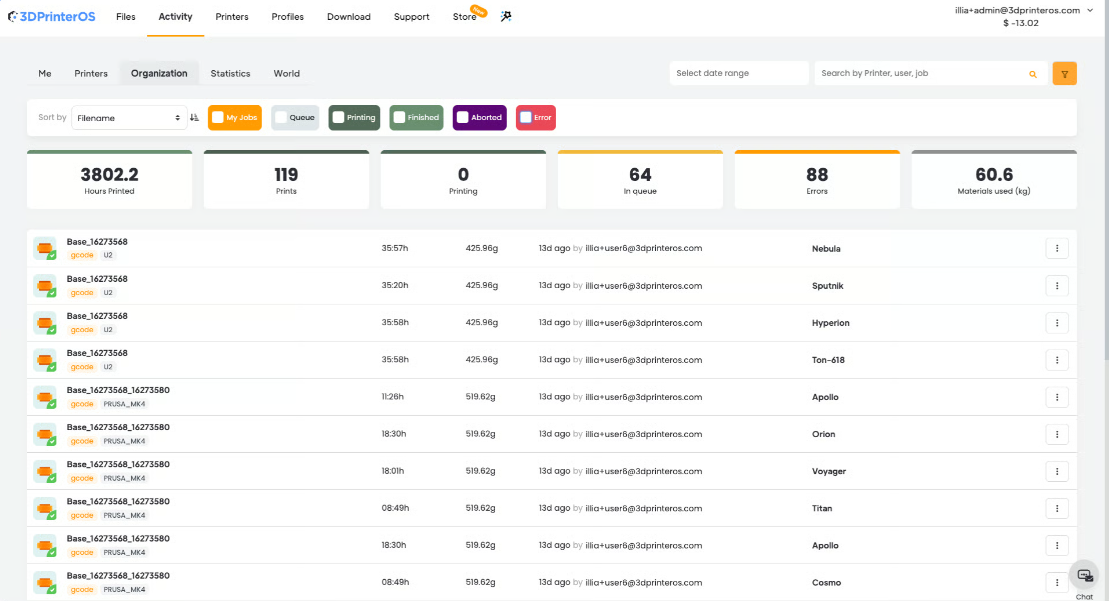




ELEGOO print farm software runs a fleet of ELEGOO printers from one dashboard: one print queue, live monitoring, user permissions and reports. 3DPrinterOS supports the ELEGOO Centauri Carbon, Centauri Carbon 2 and OrangeStorm Giga, and keeps them in the same queue as the Bambu Lab, Prusa, Creality and other printers in your farm.
The Centauri Carbon brought enclosed CoreXY printing with carbon-fiber materials to a lower price, so many farms now add ELEGOO printers next to the brands they already run. Buying printers is the easy part. Running them is harder: someone has to route jobs to free machines, keep profiles consistent, catch failed prints and track who printed what. This guide explains how an ELEGOO print farm runs in 3DPrinterOS.
The 3DPrinterOS supported printers page lists three ELEGOO models:
The two Centauri Carbon models suit high-volume production of small and medium parts. The OrangeStorm Giga is ELEGOO's large-format machine, useful when a farm needs a few printers for oversized parts next to many smaller ones.
ELEGOO describes the Centauri Carbon this way on its product page:
For a farm, the enclosure and hardened nozzle mean one printer model can handle both everyday PLA jobs and carbon-fiber parts. That keeps the fleet uniform, which makes queue routing simpler. Compare it with printers from other brands in our guide to the best 3D printers for print farms.
Printers connect through the 3DPrinterOS client, which turns a Raspberry Pi, ROCK Pi or computer into a dedicated printer controller. The 3D printer controller page describes three steps:
One Raspberry Pi can host up to 15 printers and a computer can host 50 or more. Camera feeds need extra resources, so large farms often spread printers across several hosts. The client runs on Raspberry Pi, ROCK Pi, Windows, macOS and Linux, and boards connect over Ethernet, Wi-Fi and USB. For setup notes on a specific ELEGOO model, open its printer page or ask the 3DPrinterOS team.
Jobs go to a printer group instead of a single machine, and the next free printer takes the job. ELEGOO printers can share that queue with other brands, so the farm keeps one place to send work even as the fleet changes. See print queue management for how routing works.
The dashboard shows live status, temperatures, progress and camera feeds for every printer, and operators can pause or cancel jobs remotely. Print Fail Detector watches prints for failures and notifies the operator, which matters on long carbon-fiber jobs where a failure wastes expensive material.
Farms that print for customers, students or several teams need control over who prints. 3DPrinterOS supports roles, approvals, print limits, balances and quotas per user. A manager can require approval before a job starts, for example before a long run on carbon-fiber filament.
The online slicer runs in any browser with profiles for 200+ printers, with no software to download. Users can scale, orient and repair STL files, and every file version is stored on the account.
Filament, machine hours, per-job cost and utilization are tracked by printer, user and department, with chargebacks and payments for farms that bill their users. Job history shows when the farm needs more printers and which one needs service; pair it with a 3D print farm maintenance checklist.
3DPrinterOS runs in the cloud or on-premise, so the same workflow fits a print business and a lab with strict IT rules.
Add printers to the organization, place them in groups and let the queue spread the work. Fantasy Pets, a product-based print farm, runs 116 printers from 3DPrinterOS with plans for up to 200, managed by one or two skilled people. Across all customers, 3DPrinterOS has printed 10M+ parts for 2.5M+ users at 500+ companies and universities, including NASA, NIH, Google and Koenigsegg.
Starting from zero? Read how to start a 3D print farm. For the full farm feature set, see 3D printer farm management software, and for the platform as a whole, see 3D printer management software. Ready to connect your ELEGOO fleet? Set a meeting now, or start a free 14-day trial.
ELEGOO print farm software connects many ELEGOO printers to one dashboard, so jobs, users and monitoring sit in one place. 3DPrinterOS does this for the Centauri Carbon, Centauri Carbon 2 and OrangeStorm Giga, and lets them share a queue with other brands.
The 3DPrinterOS supported printers list includes the ELEGOO Centauri Carbon, Centauri Carbon 2 and OrangeStorm Giga.
Use the 3DPrinterOS client on a Raspberry Pi, ROCK Pi or computer. Download the image from Downloads, flash it to an SD card, start the board and connect your printers. One Raspberry Pi hosts up to 15 printers; a computer hosts 50 or more.
Yes. 3DPrinterOS is vendor-neutral, so ELEGOO printers can sit in the same queue as Bambu Lab, Prusa, Creality, Flashforge and other printers. Jobs go to a printer group and the next free printer takes them.
ELEGOO lists a 256 x 256 x 256 mm build volume for the Centauri Carbon, with CoreXY motion at 500 mm/s, a 320 °C hardened steel nozzle and a fully enclosed chamber.

Used by higher education, enterprises, and OEMs to manage printers, files, and users from a single, cloud-based platform

Control access, users, and print permissions by team or lab
“This close collaboration has enabled Koenigsegg to tailor the platform to their specific needs, resulting in an optimized and user-friendly system for managing their 3D printers.”

Team Leader
Koenigsegg Automotive AB
Book your personalized assessment now and get your free trial.