


By supporting native compatibility with the Prusa slicer, 3DPrinterOS allows users to upload, slice, and manage their 3D print jobs without switching platforms or manually configuring settings. This seamless integration eliminates the hassle of file conversions and ensures a more efficient workflow for users of Prusa 3D printers. Whether you’re managing multiple devices or working from different locations, the Prusa slicer integration enables you to maintain consistency across all your prints.The centralized cloud platform also supports remote printer management, browser-based slicing, and distributed additive manufacturing workflows.
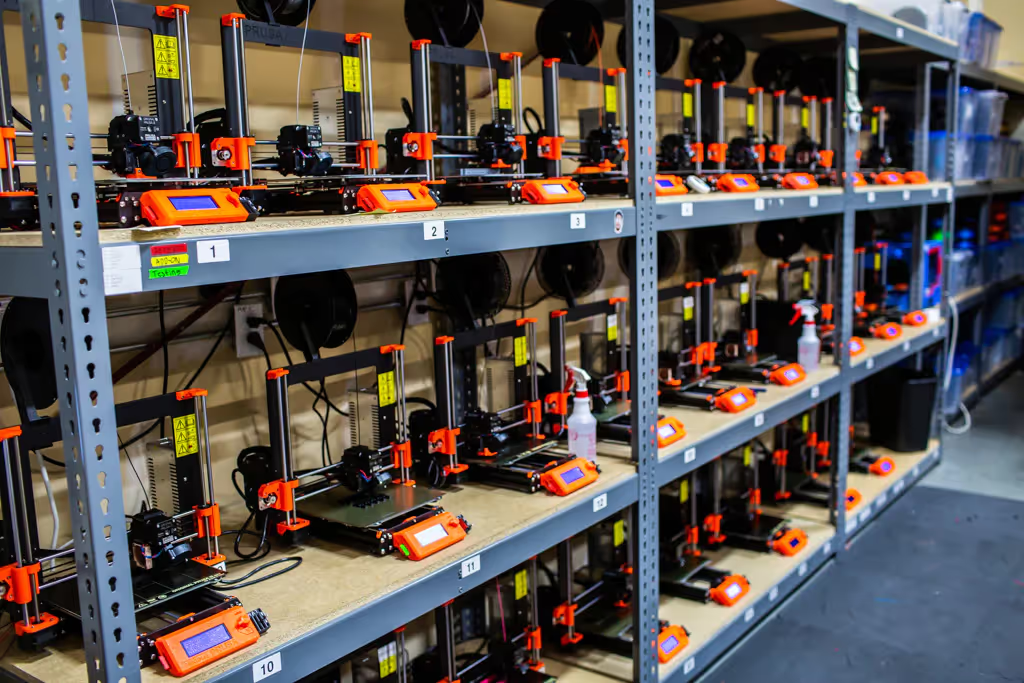
Discover how 3DPrinterOS enhances your Prusa 3D printing experience. Our Prusa cloud slicer leverages advanced slicing algorithms, cloud infrastructure, and continuously updated print profiles to improve print consistency, workflow efficiency, and remote accessibility. It works seamlessly with the Prusa slicer, ensuring consistent performance and results. The platform is designed to support educational institutions, engineering teams, makerspaces, manufacturing environments, and businesses managing multiple Prusa 3D printers.

By supporting native compatibility with the Prusa slicer, 3DPrinterOS allows users to upload, slice, and manage their 3D print jobs without switching platforms or manually configuring settings. This seamless integration eliminates the hassle of file conversions and ensures a more efficient workflow for users of Prusa 3D printers. Whether you’re managing multiple devices or working from different locations, the Prusa slicer integration enables you to maintain consistency across all your prints.The centralized cloud platform also supports remote printer management, browser-based slicing, and distributed additive manufacturing workflows.

3DPrinterOS offers a robust cloud-based slicing solution, allowing you to slice your models efficiently and accurately. Access advanced slicing algorithms, cloud-based processing, and continuously updated slicing profiles optimized for Prusa printers to improve print quality, precision, and workflow consistency.
Talk to an expertWith 3DPrinterOS, you can achieve exceptional print quality by leveraging updated profiles and slicing settings optimized for Prusa printers. Our browser-based Prusa slicing software continuously evolves with updated slicing profiles, optimized print parameters, and cloud-powered workflow improvements that help users achieve reliable, high-quality 3D prints.

By supporting native compatibility with the Prusa slicer, 3DPrinterOS allows users to upload, slice, and manage their 3D print jobs without switching platforms or manually configuring settings. This seamless integration eliminates the hassle of file conversions and ensures a more efficient workflow for users of Prusa 3D printers. Whether you’re managing multiple devices or working from different locations, the Prusa slicer integration enables you to maintain consistency across all your prints.The centralized cloud platform also supports remote printer management, browser-based slicing, and distributed additive manufacturing workflows.
Talk to an expertBy supporting native compatibility with the Prusa slicer, 3DPrinterOS allows users to upload, slice, and manage their 3D print jobs without switching platforms or manually configuring settings. This seamless integration eliminates the hassle of file conversions and ensures a more efficient workflow for users of Prusa 3D printers. Whether you’re managing multiple devices or working from different locations, the Prusa slicer integration enables you to maintain consistency across all your prints.The centralized cloud platform also supports remote printer management, browser-based slicing, and distributed additive manufacturing workflows.
Prusa slicer online is a browser-based slicing solution that enables users to prepare and manage 3D print files remotely without installing desktop software.
A Prusa cloud slicer converts STL files into printer-ready G-code using cloud-based processing and allows users to manage print jobs remotely.
Yes. Browser-based Prusa slicing platforms like 3DPrinterOS allow users to upload, slice, and manage print files directly from the cloud.
A Prusa web slicer provides remote access, centralized workflow management, updated slicing profiles, and easier multi-printer management.
Yes. Cloud-based slicing platforms can manage and queue print jobs across multiple connected Prusa printers.
No. A Prusa cloud slicer operates directly through a web browser without requiring local installation.
By supporting native compatibility with the Prusa slicer, 3DPrinterOS allows users to upload, slice, and manage their 3D print jobs without switching platforms or manually configuring settings. This seamless integration eliminates the hassle of file conversions and ensures a more efficient workflow for users of Prusa 3D printers. Whether you’re managing multiple devices or working from different locations, the Prusa slicer integration enables you to maintain consistency across all your prints.The centralized cloud platform also supports remote printer management, browser-based slicing, and distributed additive manufacturing workflows.
By supporting native compatibility with the Prusa slicer, 3DPrinterOS allows users to upload, slice, and manage their 3D print jobs without switching platforms or manually configuring settings. This seamless integration eliminates the hassle of file conversions and ensures a more efficient workflow for users of Prusa 3D printers. Whether you’re managing multiple devices or working from different locations, the Prusa slicer integration enables you to maintain consistency across all your prints.The centralized cloud platform also supports remote printer management, browser-based slicing, and distributed additive manufacturing workflows.
By supporting native compatibility with the Prusa slicer, 3DPrinterOS allows users to upload, slice, and manage their 3D print jobs without switching platforms or manually configuring settings. This seamless integration eliminates the hassle of file conversions and ensures a more efficient workflow for users of Prusa 3D printers. Whether you’re managing multiple devices or working from different locations, the Prusa slicer integration enables you to maintain consistency across all your prints.The centralized cloud platform also supports remote printer management, browser-based slicing, and distributed additive manufacturing workflows.
Talk to an expertBy supporting native compatibility with the Prusa slicer, 3DPrinterOS allows users to upload, slice, and manage their 3D print jobs without switching platforms or manually configuring settings. This seamless integration eliminates the hassle of file conversions and ensures a more efficient workflow for users of Prusa 3D printers. Whether you’re managing multiple devices or working from different locations, the Prusa slicer integration enables you to maintain consistency across all your prints.The centralized cloud platform also supports remote printer management, browser-based slicing, and distributed additive manufacturing workflows.
Talk to an expertTake your Prusa 3D printing to new heights with 3DPrinterOS. Our cloud-based Prusa slicing software streamlines print preparation, remote printer management, and workflow optimization for businesses, educational labs, engineering teams, and makerspaces. By integrating with the Prusa slicer, we deliver a streamlined, professional-grade slicing environment.


Used by higher education, enterprises, and OEMs to manage printers, files, and users from a single, cloud-based platform

Control access, users, and print permissions by team or lab
“This close collaboration has enabled Koenigsegg to tailor the platform to their specific needs, resulting in an optimized and user-friendly system for managing their 3D printers.”

Team Leader
Koenigsegg Automotive AB
Join us today and become one of our partners

