Best Filament for Print Farms: How to Choose and Standardize
How to choose the best filament for a print farm: consistent tolerances, standard colors, larger spools, one material per printer group, and filament usage tracking.




Short answer: The best filament for print farms is the one you can buy in the same color and quality every month, in spool sizes that cut changeovers, from a maker that publishes its tolerances. For most farms that means one or two PLA lines in a few standard colors, with PETG or engineering materials kept on dedicated printers.
On one printer, filament choice is about how a single part looks. On a farm, it is about repeatability. Every change of brand, color or material means new profiles, new failure modes and more time at the printer. This guide covers how to choose the best filament for print farms, how to standardize it across a fleet, and how to track what you use with 3D printer farm management software.
| Criterion | Why it matters on a farm | What to check |
|---|---|---|
| Consistent diameter | One tuned profile has to work on every spool, on every printer in the group. | A published tolerance. Prusament, for example, guarantees ±0.02 mm precision for the vast majority of its materials. |
| Traceable quality | When a batch prints differently, you need to know whether the spool or the printer changed. | Per-spool data. Prusament lets you scan a QR code on the spool to see its diameter, weight, length and ovality online. |
| Spool size | Every spool change is a stop. Larger spools mean fewer of them. | Large formats such as Prusament's 2 kg spools, and refills such as its 900 g refill, if your printers can hold them. |
| Printer integration | Some printers read material settings from the spool, which removes a manual step. | Bambu Lab embeds printing parameters in an RFID tag on Bambu filament, read through its AMS. |
| Supply | A color that goes out of stock forces a profile change mid-order. | Stock across several distributors, and a second approved brand for each standard color. |
The quickest way to make a farm easier to run is to limit choice. Pick a short list of standard colors, often black, white and grey, and one primary material. Every extra color multiplies spare spools, partly used spools and the chance that the right color is loaded on the wrong printer.
Group printers by material. Keep PLA printers in one group, and put PETG or engineering materials on their own printers with their own profiles and maintenance schedule. Abrasive filaments wear parts faster: Bambu Lab, for example, says to check the X1's cutter blade after only 1-2 rolls of PA+CF or PA+GF, against 3-5 rolls for PLA. The 3D print farm maintenance checklist lists those intervals.
Always use the temperatures and settings from the filament maker's own data sheet, then lock them in a shared profile so every operator prints the same way.
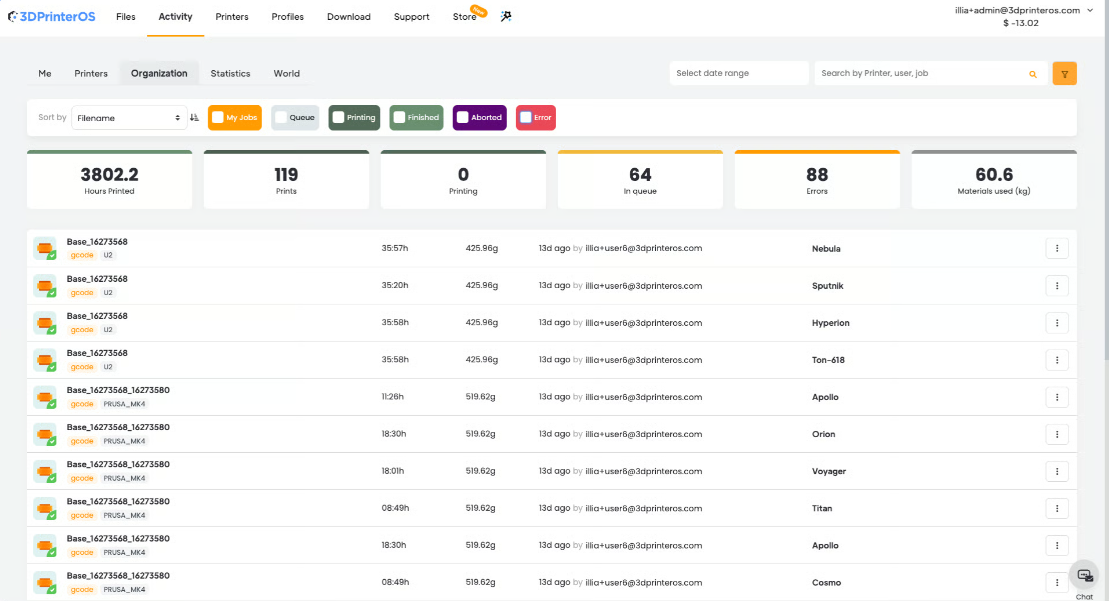
Printing history in 3DPrinterOS logs every job with its user, printer and file, which gives you the success rates to compare brands without a spreadsheet.
Keep spools sealed until they are loaded, label opened spools with the date and the printer they came from, and use partly used spools for short jobs rather than letting them pile up. Keep the desiccant that ships with a spool; Bambu Lab, for example, ships its PLA Basic spool with a desiccant pack. A small habit like this prevents mid-print failures that are hard to trace later.
A farm cannot plan material orders without knowing what it uses. 3DPrinterOS records how much filament each print uses and shows consumption by user, printer and group. Admins set a price per gram, and 3DPrinterOS turns material use into a cost for every job, which feeds billing, user balances and cost reports. Usage totals for any period help you order before you run out.
One limit to know: 3DPrinterOS tracks the filament your prints use, not the spools on your shelves. If you need shelf-level inventory, keep it in a separate stock list and use the usage totals to plan reorders. See filament usage tracking for details.
If you are still planning the farm, start with how to start a 3D print farm and the guide to the best 3D printers for print farms.
3DPrinterOS is 3D printer management software for organizations that share printers. It does not sell or stock filament. It gives a farm locked slicing profiles in the cloud, shared queues that route jobs to the next free printer, Print Fail Detector alerts, and filament usage and cost reports by user, printer and group. It supports 200+ printer models and is used by 500+ companies and universities, including NASA, NIH, Google and Koenigsegg.
For most farms, a PLA line you can reorder in the same colors every month, from a maker that publishes its diameter tolerance. Keep PETG and engineering materials on dedicated printer groups with their own profiles.
As few as possible. Many farms standardize on black, white and grey, then add colors only for regular orders. Fewer colors mean fewer spare spools and fewer wrong-color prints.
Usually, if your printers can hold them. Each spool change stops a printer, so 2 kg spools or refills cut changeovers. Check the spool holder and any automatic material system first.
Yes. 3DPrinterOS records how much filament each print uses and shows usage by user, printer and group. Admins set a price per gram to turn usage into a cost per job.
No. 3DPrinterOS tracks the filament your prints use, not the spools on your shelves. Use its usage totals to plan how much material to order.

Used by higher education, enterprises, and OEMs to manage printers, files, and users from a single, cloud-based platform

Control access, users, and print permissions by team or lab
“This close collaboration has enabled Koenigsegg to tailor the platform to their specific needs, resulting in an optimized and user-friendly system for managing their 3D printers.”

Team Leader
Koenigsegg Automotive AB
Book your personalized assessment now and get your free trial.