Single sign-on
Sign in through SAML, Shibboleth, OKTA or InCommon, so there are no shared logins and access ends when people leave.
The best Printago alternative for a farm shared by many people is one built around users as well as orders. Printago turns online store orders into queued prints for Bambu Lab, Prusa, Creality and other printers. 3DPrinterOS adds single sign-on, job approval, quotas and billing per user, and private or on-premise deployment across 200+ printer models.
Free 14-day trial.


Printago describes itself as print farm software that runs production from order to finished print, for operations from side hustle to full production facility. Its strengths are commerce and automation: native integrations with Shopify, Etsy, eBay, WooCommerce and Wix, material-aware routing that sends each job to a printer with the right filament loaded, and FabMatic, which uses custom end G-code to clear finished parts and start the next job. Bambu Lab printers connect to its cloud directly, and other printers use its free Fuse bridge app.
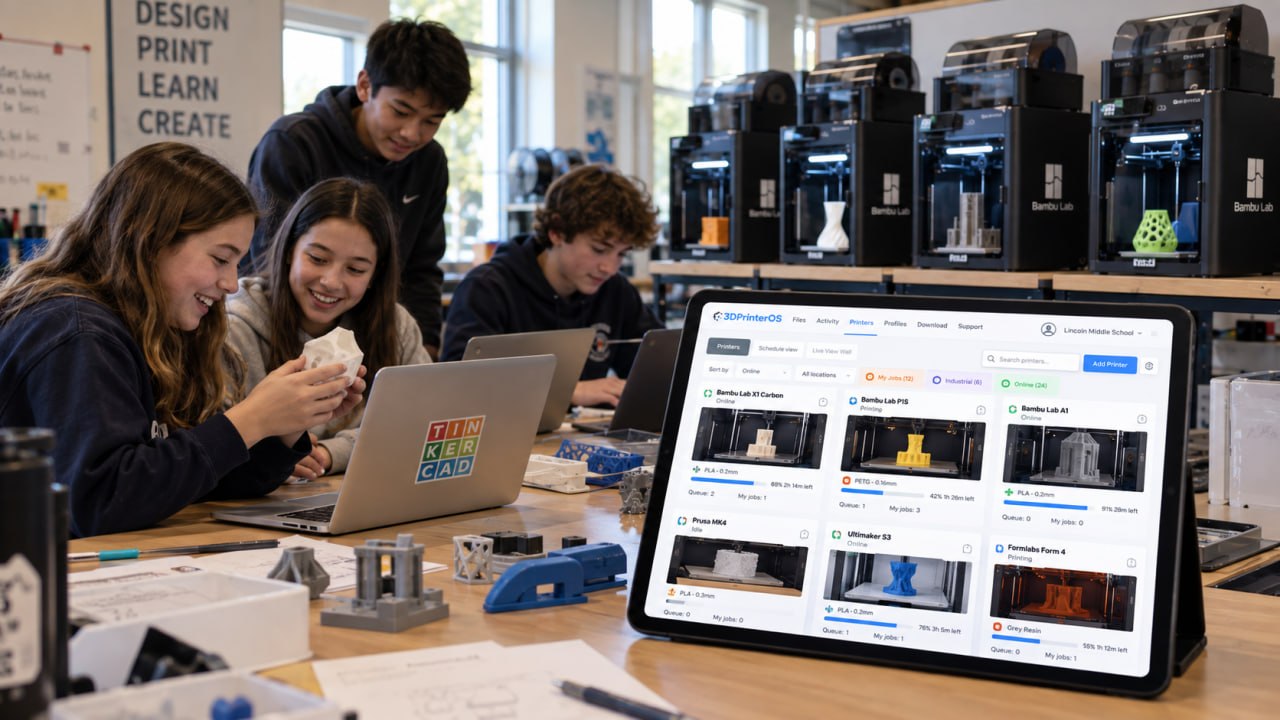
A university, school, lab or company farm has a different problem. The people sending jobs are students, staff or engineers, not store orders. Someone has to sign them in, decide who may print on which machine, approve jobs, charge each user or department, and keep files inside the organization's own network. Those are the core of 3D printer management software such as 3DPrinterOS.
Sign in through SAML, Shibboleth, OKTA or InCommon, so there are no shared logins and access ends when people leave.
Share printers, file folders and slicing profiles with workgroups, and require approval before a job starts.
Print limits, balances, billing and cost tracking per user, printer and department, with chargebacks.
AI failure detection for unattended prints, and controls that stop a new job from starting on a printer whose bed has not been cleared.
Managed cloud on Microsoft Azure in the U.S. or Europe, your own cloud, or on-premise and air-gapped servers.
Usage reports, job history, success rates, filament tracking and searchable print history across every printer and user.
Both run mixed fleets from one dashboard and queue. The differences are in commerce on one side and users, compliance and reporting on the other.
| Feature | Printago | 3DPrinterOS |
|---|---|---|
| Mixed-brand fleet in one dashboard and queuePrintago: Bambu Lab, Creality, Prusa, Snapmaker, Elegoo, Klipper/Moonraker. 3DPrinterOS: 200+ models incl. Bambu Lab, Prusa, Ultimaker, Creality, Dremel | ✓ | ✓ |
| Jobs routed to the next suitable printer | ✓ | ✓ |
| Cloud slicingPrintago: OrcaSlicer and Bambu Studio. 3DPrinterOS: Slicer 5, Prusa Slicer, Bambu Slicer, MakerBot Slicer, Formlabs Slicer | ✓ | ✓ |
| Live cameras and remote control | ✓ | ✓ |
| API for integrations | ✓ | ✓ |
| Permission levels and job history | ✓ | ✓ |
| Native store integrations (Shopify, Etsy, eBay, WooCommerce, Wix) | ✓ | – |
| Automatic part clearing with end G-code (FabMatic) | ✓ | – |
| Job approval before a print starts | – | ✓ |
| Balances, quotas and billing per user or department | – | ✓ |
| Single sign-on (SAML, Shibboleth, OKTA, InCommon) | – | ✓ |
| AI failure detection | – | ✓ |
| Local or self-hosted option | ✓ | ✓ |
| Air-gapped on-premise servers and a choice of U.S. or EU managed cloud | – | ✓ |
Printago features as described on printago.io, checked 16 Nov 2026. "–" means not described there. Printago also pauses jobs on errors or filament runout. Plans and features change, so check Printago for current details.
Connect printers through the 3DPrinterOS client on a PC or Raspberry Pi, or directly for supported models. Bambu Lab printers from the A, P, X and H series are supported.
Group printers by material, size or location, so a job sent to a group goes to the next free printer.
Create workgroups and roles or connect single sign-on, then turn on approvals, print limits and balances where you need them.
Upload files sliced in Bambu Studio or PrusaSlicer as before, or slice in the cloud with printer profiles.
Connect each printer to 3DPrinterOS once and manage the whole farm from any browser.
Dublin City University runs a makerspace farm of 18 Prusa MINI printers, a Prusa MK4 and 2 Ultimakers, where 230 users completed 2,353 prints in one semester. Fantasy Pets, a product-based print farm, manages 116 printers from one interface and often sends one print to 10 printers at a time.
One queue across printer groups, with cost per job.
3D printer farm management →Shared labs with approvals, balances and usage data.
Higher education →SSO, audit-ready history and private deployment.
Enterprise →A, P, X and H series printers in one dashboard.
Bambu Lab fleet management →For printers shared by many users, 3DPrinterOS. It keeps a mixed-brand dashboard and queue, and adds single sign-on, job approval, quotas and billing per user, AI failure detection, usage reports and on-premise or air-gapped deployment.
Not for order automation. Printago has native integrations with Shopify, Etsy, eBay, WooCommerce and Wix that turn orders into print jobs. 3DPrinterOS focuses on managing printers, users, files, queues and costs across an organization, with an API for your own integrations.
Yes. 3DPrinterOS supports Bambu Lab printers from the A, P, X and H series, and they can share dashboards and queues with Prusa, Ultimaker, Creality and other brands. You can keep slicing in Bambu Studio.
Yes. You can use the managed cloud on Microsoft Azure in the U.S. or Europe, your own cloud, or an on-premise or air-gapped server.
Yes. 3DPrinterOS is free for 14 days, so you can connect a few printers and test queues, approvals and reports before moving the whole farm.
See how 3DPrinterOS queues, approves, bills and reports every print in your farm.

Hochschulen, Unternehmen und OEMs verwalten damit Drucker, Dateien und Nutzer über eine zentrale Cloud-Plattform

Zugriffe, Nutzer und Druckrechte nach Team oder Labor steuern
„Diese enge Zusammenarbeit hat es Koenigsegg ermöglicht, die Plattform genau auf die eigenen Anforderungen zuzuschneiden – mit dem Ergebnis eines optimierten, benutzerfreundlichen Systems zur Verwaltung der 3D-Drucker.“

Teamleiter
Koenigsegg Automotive AB
Buchen Sie jetzt Ihre persönliche Beratung und sichern Sie sich Ihre kostenlose Testphase.
Hochschulen, Unternehmen und OEMs verwalten damit Drucker, Dateien und Nutzer über eine zentrale Cloud-Plattform
Zugriffe, Nutzer und Druckrechte nach Team oder Labor steuern
„Diese enge Zusammenarbeit hat es Koenigsegg ermöglicht, die Plattform genau auf die eigenen Anforderungen zuzuschneiden – mit dem Ergebnis eines optimierten, benutzerfreundlichen Systems zur Verwaltung der 3D-Drucker.“
Teamleiter
Koenigsegg Automotive AB
Buchen Sie jetzt Ihre persönliche Beratung und sichern Sie sich Ihre kostenlose Testphase.

