
September 2026 product update: printer-based Workgroup Settings and user CSV import and export
The September release focused on organization management, giving admins finer control over where settings apply and less manual work when handling user lists. Labs and print farms that split their printers across several workgroups will notice the biggest difference, along with any team that brings users on in large batches.
Highlights
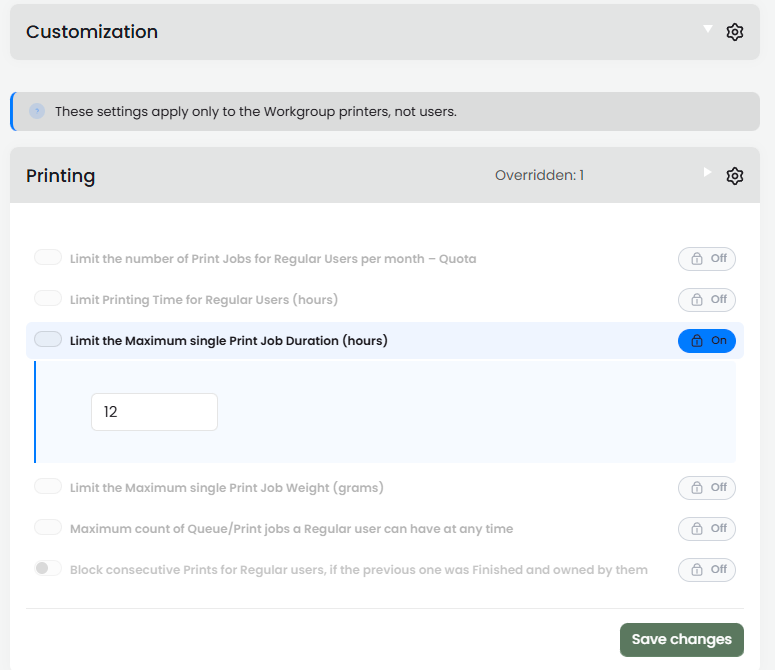
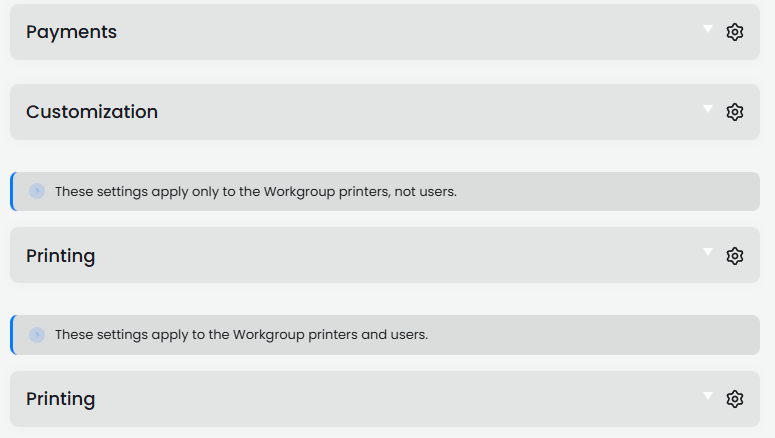
Workgroup Settings can now follow printers as well as users
Until now, Workgroup Settings applied to the users in a workgroup and travelled with them to any printer they were allowed to use. Two new sections add printer-based rules. Settings in Printers Only apply according to the printers assigned to the workgroup, whoever sends the job, while settings in Printers + Users apply only when both the printer and the user involved in an action belong to that same workgroup.
This makes it easier to give one group of machines its own rules without changing anything for the people who also print elsewhere in the organization. Each settings block also shows an Overridden count, so you can see at a glance where a workgroup departs from the organization defaults.
A workgroup only shows its Settings tab once Enable settings priority is turned on in its General tab, so switch that on first if you don't see the tab.
Export and import users with a CSV file
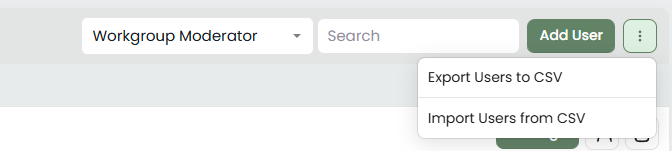
The three-dot menu on the Users tab now offers Export Users to CSV and Import Users from CSV. The same two options sit on each workgroup's Users tab, so you can work with the whole organization or with a single workgroup.
Exporting gives you a current copy of the user list to keep or review in a spreadsheet, and importing lets you bring a prepared list back in rather than handling accounts one at a time.
Where to find it
Search Organization Settings, and let regular users confirm the bed is clear
Organization Settings now has a search box above the settings list. Type a word and the page narrows to the matching options across every section, which saves scrolling through a long list when you know roughly what you are looking for.
The Printing section also has a new option, Regular users can confirm that the Build tray is clear. Until now this confirmation was limited to the printer owner, Advanced Users and admins with print rights. With the option on, regular users can confirm the bed themselves, which helps in labs where people collect their own finished prints.
Where to find it

Other improvements
Organization management
- CAD (Canadian Dollar) is now a supported currency in Organization Settings.
Slicing
- Prusa Cloud Slicer profiles have a new
append_gcodessetting in the Expert tab, which adds your own G-code commands to the end of every sliced file.
API
- In APIGlobal,
get_workgroup_usersandget_org_usersnow return the first name innameand the last name in a newlnamefield. Integrations that readnameas a full name should be checked.
Downloads
- The installation guide tooltip in the Mac section of the Downloads page now has a Copy button.
Fixes
- Fixed issues related to multi-factor authentication (MFA).
- Additional fixes for the legacy 2020 interface.
Every change in this update is listed in the full changelog.
If you have a question about any of these updates or want to share how they work in your lab, message us through the Intercom chat inside 3DPrinterOS and the support team will pick it up.
Talk to an expert