Print from anywhere
Upload, slice and start prints on your Dremel from any browser, on your laptop, tablet or phone.


Your Dremel cloud already runs on 3DPrinterOS. Upgrade to the full platform to print from anywhere, catch failed prints automatically, track every job and add more printers as your hobby grows.
14-day free trial. No credit card required.









The same 3DPrinterOS cloud trusted by universities and enterprises, ready for your Dremel.
Upload, slice and start prints on your Dremel from any browser, on your laptop, tablet or phone.
Spot spaghetti and failed prints early and get alerted before a small problem wastes a whole spool.
Follow your prints live and get notified the moment a job finishes or needs attention.
Fine-tune layer height, infill, supports and speed in the browser, then send straight to your printer.
See your printing history, time and material use, and reprint past jobs in a click.
Your files stay in your private cloud library, shared only with the people you choose.
Create your 3DPrinterOS account and get 14 days of the full platform, no credit card required.
Add your Dremel 3D printer to 3DPrinterOS. Set-up assistance is included if you need a hand.
Slice, send and watch your prints from any device, and add other printers whenever you like.
Connect your printer to 3DPrinterOS once and manage it from any browser.

Start a print before you leave home, check on it from your phone and come back to a finished part. 3DPrinterOS works with the Dremel 3D40 and 3D45.
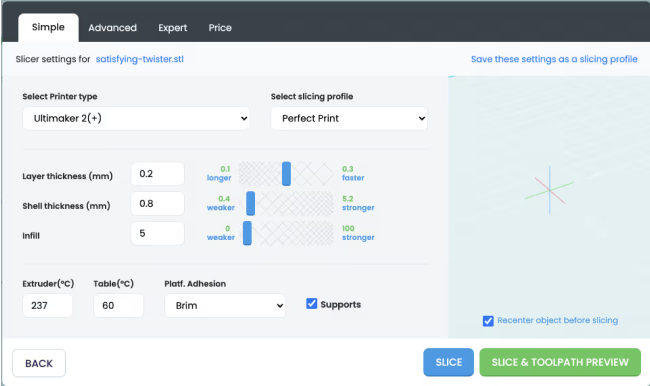
Import STL and OBJ files, scale and rotate them, adjust print settings and send the job to your Dremel without installing anything.
Bought a second printer from another brand? 3DPrinterOS supports 200+ printer models, so all your machines live in one dashboard.
Click through slicing a model and sending it to a printer in 3DPrinterOS, right here in your browser.
The Dremel cloud runs on 3DPrinterOS. Upgrading gives you the full platform, including AI print failure detection, data tracking and analytics, remote monitoring and support for more printers.
You get 14 days of 3DPrinterOS for free, and no credit card is required to start.
3DPrinterOS works with Dremel DigiLab 3D printers, including the 3D40 and 3D45, alongside 200+ printer models from other brands.
Not to print. You slice, send and monitor prints in your web browser. Your printer is connected to 3DPrinterOS once, and set-up assistance is included.
Yes. 3DPrinterOS supports 200+ printer models, so you can run your Dremel next to Bambu Lab, Prusa, Creality and other printers in one dashboard.
Choose the plan that suits you to keep using the full platform. You can compare plans on our pricing page or talk to our team.
Start your 14-day free trial today. No credit card required.

Used by higher education, enterprises, and OEMs to manage printers, files, and users from a single, cloud-based platform

Control access, users, and print permissions by team or lab
“This close collaboration has enabled Koenigsegg to tailor the platform to their specific needs, resulting in an optimized and user-friendly system for managing their 3D printers.”

Team Leader
Koenigsegg Automotive AB
Buchen Sie jetzt Ihr personalisiertes Assessment und erhalten Sie Ihre kostenlose Testversion.
