The 3D Printing Operations Stack: How a 3D Printer Operating System Ties Management Software and Apps Together


Most organizations do not struggle to scale 3D printing because the printers are incapable. They struggle because the operating processes around those printers were built one task at a time.
A design file may arrive through one application. An engineer or student opens it in another tool for preparation. Slicing happens on a local workstation. A lab manager tracks demand in a spreadsheet, while printer status depends on someone standing near the machine. Each tool may perform its assigned function, yet the organization still lacks a reliable view of the complete workflow.
That gap is manageable when one person runs one or two printers. It becomes an operational problem when a university serves hundreds of students, a manufacturer adds machines across departments, or an OEM coordinates additive manufacturing across facilities. At that point, the challenge is no longer how to start a print. It is how to control access, maintain consistent settings, allocate capacity, protect files, and understand what happened after a job was submitted.
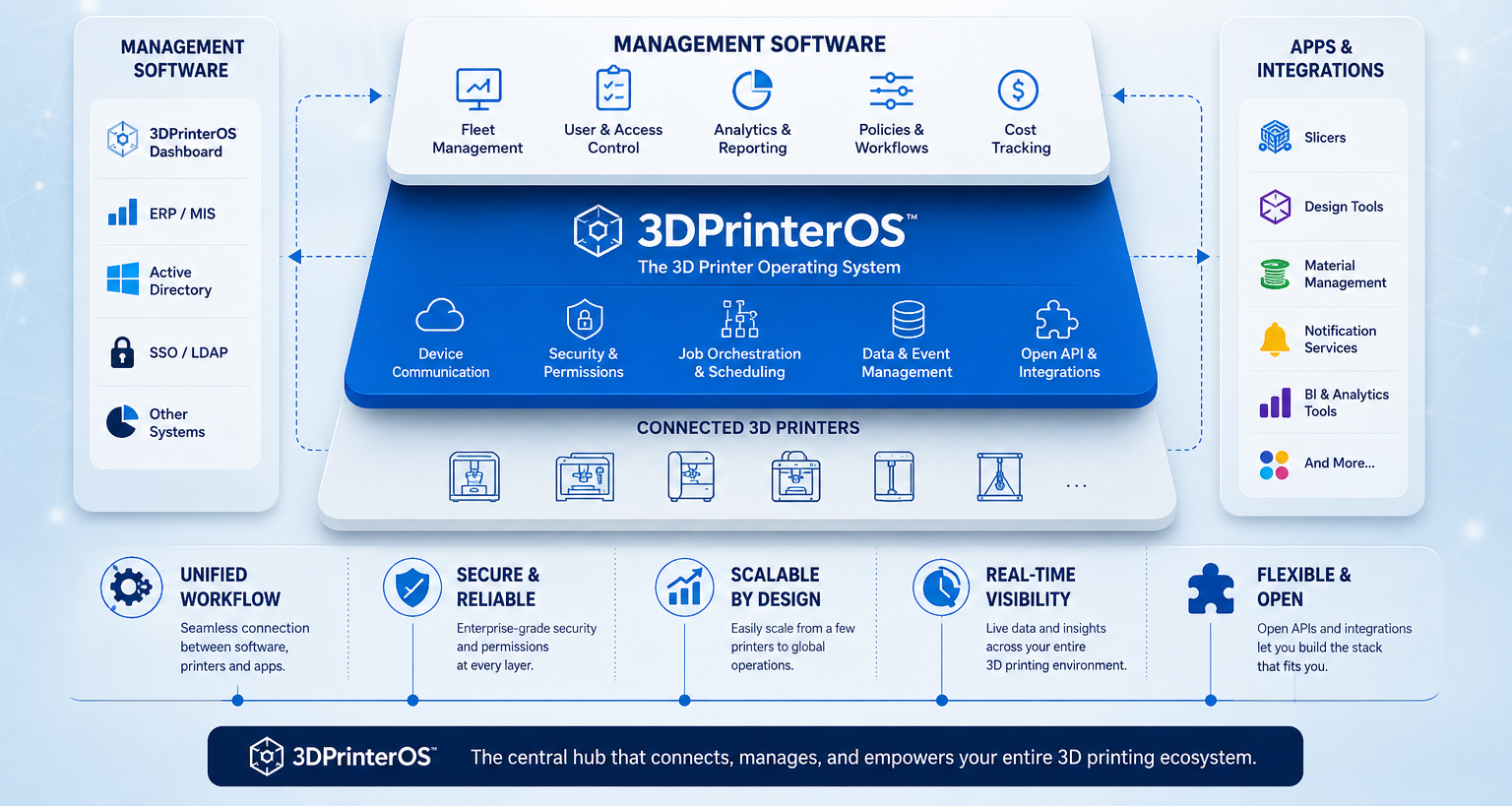
A 3D printer operating system provides the coordination layer for that work. It connects model preparation, cloud slicing, 3D printing management software, remote monitoring, and 3D printing apps in one environment. The concept is similar to a computer operating system, which allows applications, users, and hardware to work through a common structure.
This guide explains what that operating system model means in practice, where management software fits within the stack, how connected apps extend the workflow, and what enterprises, educational institutions, and OEMs should consider before standardizing their 3D printing operations.
A 3D printer operating system is cloud-based software that coordinates the additive manufacturing workflow across a fleet of printers. It manages how models are prepared, sliced, submitted, approved, printed, monitored, and recorded. It also governs how users gain access to printers and files.
The word operating is important. A slicer performs a specialized task. Printer firmware controls the machine itself. A monitoring application reports status. A 3D printer operating system does not eliminate those functions. It connects them and provides a common administrative layer.
This distinction becomes especially important in environments with many printers, many users, or multiple locations. Without a shared system, each new printer and user adds another point that someone must configure, supervise, and reconcile. With a shared system, the organization can apply common rules and maintain a single operational record across the fleet.
Operational efficiency is one reason organizations are expanding their use of additive manufacturing. A 2025 study found that 80% of surveyed companies using 3D printing experienced shorter production lead times. As adoption grows, centralized software becomes important for coordinating files, users, queues, and printers without introducing new workflow bottlenecks.
The need for an operating system is not always obvious in a small lab. One experienced operator can remember which file is current, which printer is available, and which profile usually works. Much of the process exists in that person’s knowledge.
Scale exposes the weakness in this arrangement. When more people submit jobs, unwritten knowledge stops being dependable. When more printers are added, walking the floor is no longer an efficient way to check capacity. When several departments use the same equipment, informal access rules create delays and confusion.
A 3D printer operating system turns those informal decisions into a managed process. The core functions usually include:
The practical value is consistency. A rule established for one department does not have to be recreated manually for every printer. An approved file can be made available through one controlled source instead of being copied across individual devices. A manager can review the fleet as a system instead of collecting updates machine by machine.
This changes the questions decision makers should ask. Print quality still matters, but it is not the only measure of a mature operation. Engineering managers, lab leaders, and IT administrators also need to know whether the system can control access, maintain file integrity, support mixed hardware, and produce a dependable record of activity.
The coordination challenge varies by setting, but the underlying need remains similar.
Universities and educational institutions often manage a large and changing user population. Role-based administration lets them organize permissions around courses, labs, or responsibilities instead of updating access printer by printer.
Enterprises and manufacturers focus more heavily on repeatability and accountability. A centralized history helps teams determine which model revision, slicing profile, material, and printer were involved when results differ.
OEMs may coordinate validation work across facilities or partner locations. Centralized files and approved settings reduce variation caused by local interpretation, workarounds, or outdated instructions.
Makerspaces and shared labs often have limited staff and users with varied experience. A coordinated workflow helps staff prioritize demand and protect shared settings.
The priorities differ, but the structure is consistent: one environment governs users, files, printers, and activity across the operation.
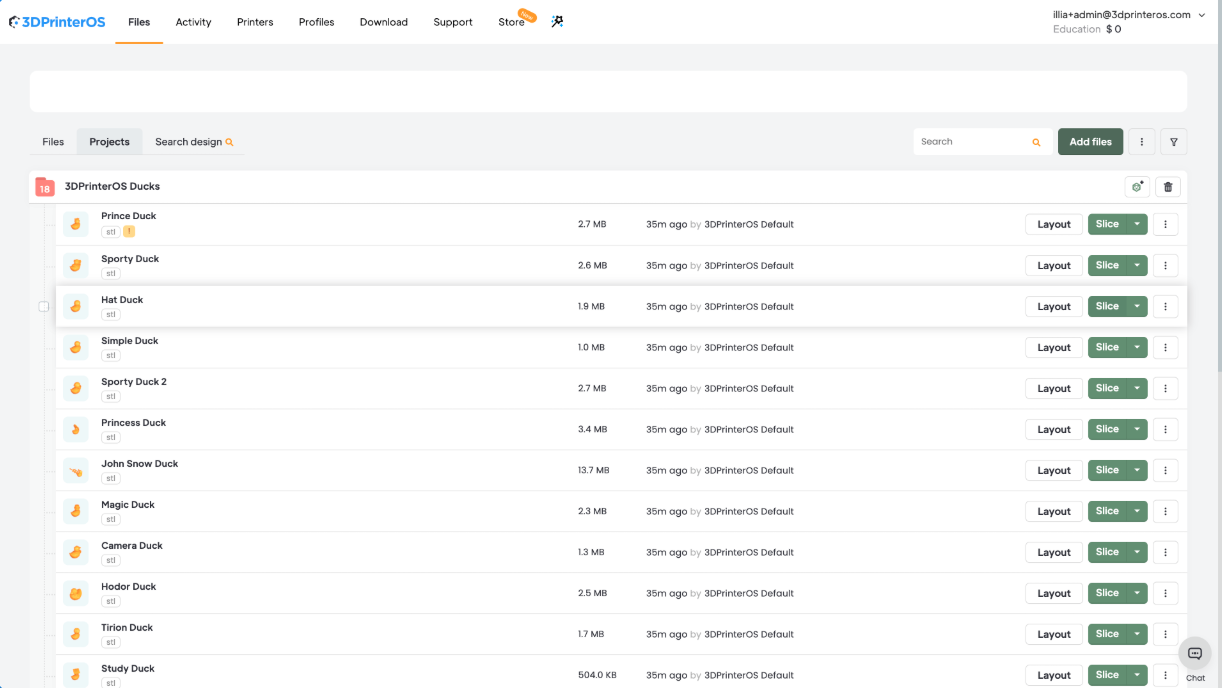
If the operating system is the coordination layer, 3D printing management software is where that coordination becomes daily practice. It is the part administrators and operations teams use to organize demand, assign work, review printer availability, and maintain control over shared resources.
The stack can be understood in three layers:
These layers overlap, but they are not interchangeable. A local slicer may generate excellent machine instructions without knowing whether the user is authorized to print, whether the selected file is approved, or whether another printer is better suited to the job. Management software supplies that operating context.
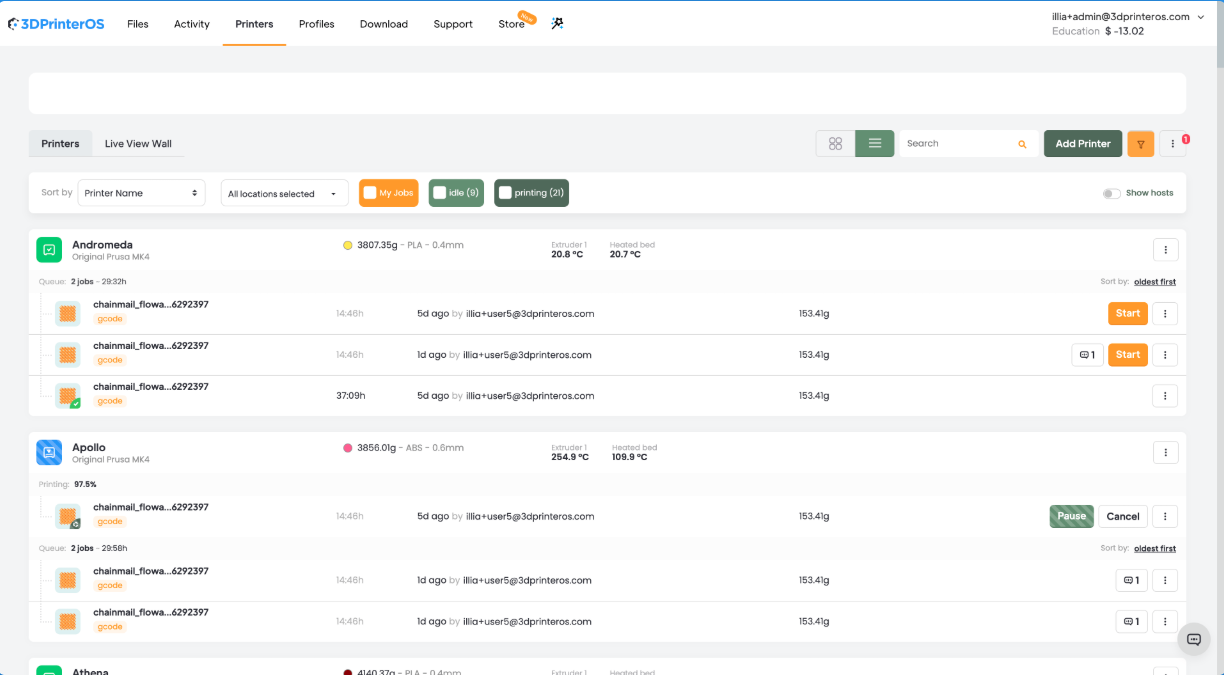
A queue is more than a list of pending jobs. In a busy environment, it is a mechanism for balancing demand against available capacity.
Without centralized queue management, users often choose a familiar printer even when another compatible machine is idle. High-priority work may sit behind routine jobs. Staff may also spend time moving files between machines when equipment becomes unavailable.
Centralized queue management allows the organization to establish practical routing criteria, such as printer capability, material, user priority, or approval status. The objective is not to automate every decision. It is to make allocation visible and consistent, so supervisors can intervene when business priorities require it.
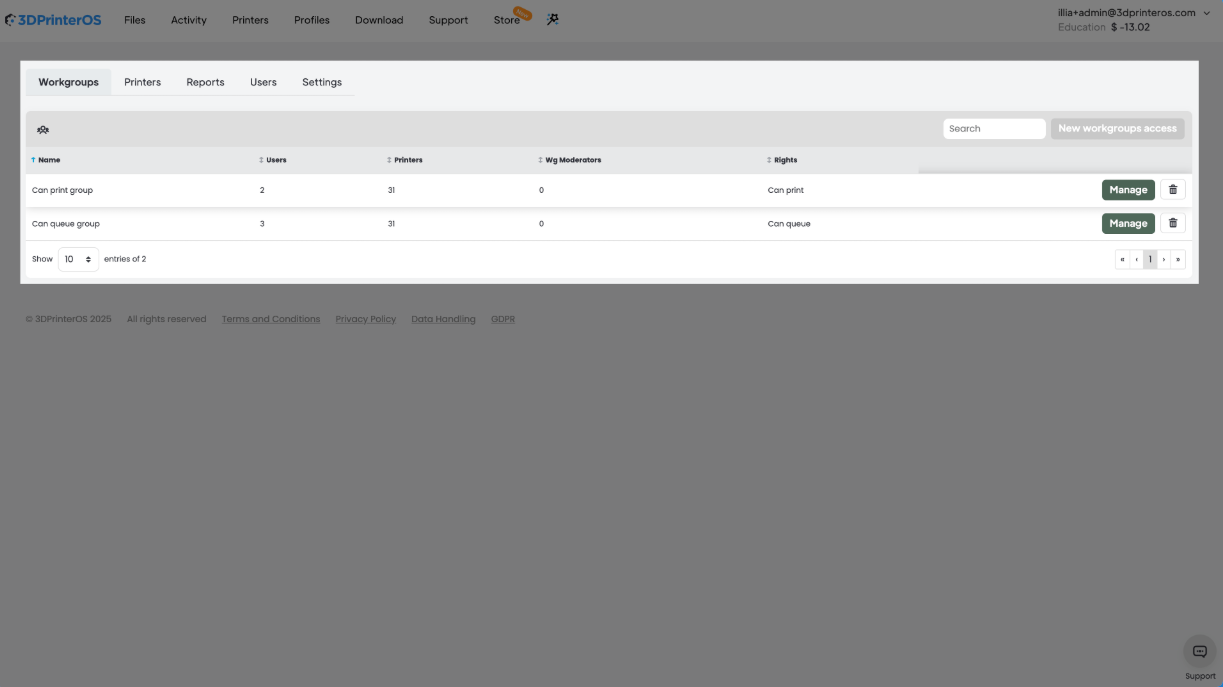
As the user base grows, equal access becomes difficult to manage and rarely reflects how the operation actually works. A student submitting coursework should not necessarily have the same controls as a lab technician. An engineer may need to upload and prepare files, while a production supervisor retains final approval authority.
Role-based permissions translate these responsibilities into the software. They reduce dependence on shared credentials and make it easier to update access when people change roles or leave the organization. For IT teams, this also creates a clearer boundary between ordinary use and administrative control.
File management becomes an operational concern when the same model exists in several folders, email threads, and personal devices. The risk is not limited to storage inefficiency. Someone may print an obsolete revision or apply a profile developed for a different printer and material.
A centralized library provides a defined location for approved models and profiles. Version visibility helps users identify what should be printed, while job history connects the file to actual production activity. That connection is valuable during troubleshooting because the team can examine the input and process record instead of relying on memory.
Individual printer dashboards are useful for immediate status. Fleet reporting answers broader operational questions. Which machines carry most of the workload? Where do queues repeatedly form? Are certain jobs or profiles associated with more failures? Does demand justify another printer, or would better scheduling solve the problem?
These decisions require consistent data. Centralized management captures activity through the same workflow, reducing manual consolidation and making reports easier to interpret.
These capabilities can sit above hardware already in service. This is why compatibility with a mixed printer fleet matters. 3DPrinterOS supports more than 200 printer models, allowing organizations to introduce common management practices without first replacing every machine with a single brand.
Connected 3D printing apps extend the operating system into specific tasks. They may handle cloud slicing, remote printing, model preparation, notifications, or monitoring. Their value comes not only from the task they perform, but also from their access to the same users, files, printers, and job records as the wider platform.
Local slicing gives experienced users direct control, but it can create variation when every workstation runs a different software version or stores separate profiles. Two users may begin with the same model and produce different machine instructions because their settings do not match.
Cloud slicing brings the process into a shared environment. Users can prepare models from a browser and work with profiles maintained for the organization’s printers and materials. Standardization does not remove engineering judgment. It gives that judgment a controlled starting point and reduces accidental variation in routine work.
Remote access separates supervision from physical proximity. A lab manager can review active jobs without walking to every printer. A production supervisor can check activity across several rooms or locations. Authorized users can submit work and follow its progress through the same interface.
This does not eliminate the need for safe onsite procedures. Printers still require appropriate physical oversight, maintenance, and material handling. Remote monitoring improves awareness and response time, but it should support established operating practices rather than replace them.
An alert is useful when it leads to timely action. Notifications for completed jobs, suspected failures, or printers requiring attention can shorten the gap between an event and a response. That helps staff clear completed work, investigate interruptions, and protect queue schedules.
The advantage is strongest when the alert remains connected to the job record. The recipient sees the user, file, printer, and status in context instead of investigating an isolated warning.
Many print failures begin before slicing. Geometry may contain gaps, scaling may be incorrect, or a model may not be suitable for the intended process. Model preparation and validation tools help identify these issues before a printer consumes time and material.
Early checks are valuable because the cost of a problem rises as it moves through the workflow. Correcting a model before queue approval is usually simpler than diagnosing a failed build after several hours of printing. Integrated validation also keeps the corrected file and its subsequent job history in the same environment.
A standalone monitoring app can report that a print stopped. It may not show whether the file was an approved revision, who submitted it, which profile was used, or what work is waiting behind it. A connected app can place the event within the operating context.
That shared context is the difference between a collection of useful tools and an operational stack. Apps extend specific capabilities. They do not replace the governance, records, and coordination provided by the operating system beneath them.
Selecting a separate tool for every task can work while the operation is small. The approach becomes harder to sustain as printers, users, and sites are added. The issue is not the number of applications by itself. It is the number of gaps between them.
Three problems appear repeatedly.
When slicing, file storage, queues, and monitoring operate separately, no dashboard presents the complete state of the fleet. Administrators must compare systems or ask local operators for updates. Even a basic capacity question can require several checks, and the answer may be outdated by the time it is assembled.
Permissions established in one tool do not automatically carry into another. A former user may lose printer access but retain files elsewhere. One department may use a current profile while another continues with an older copy. Each gap introduces avoidable uncertainty around access and process consistency.
Every disconnected tool creates its own accounts, configuration, updates, and support requirements. Files are copied between systems. User changes are repeated. Reports are rebuilt manually. The operational burden may not appear in a software budget, but it becomes visible in the time spent reconciling information.
A unified 3D printer operating system addresses these issues through a common data and administration layer.
The goal is not consolidation for its own sake. The goal is a dependable answer to operational questions. Leaders should be able to see what is printing, what is waiting, who has access, which file was used, and where capacity is constrained without reconstructing the story from separate systems.
Organizations often create fragmentation unintentionally. Common patterns include:
The remedy is to define the operating model before comparing features. Identify who submits work, who approves it, where files should live, how jobs should be prioritized, and what records the organization needs. Those requirements reveal whether a group of tools can function as a system.
Adopting a 3D printer operating system is not simply a software installation. It changes how work enters the fleet, how decisions are recorded, and how responsibilities are assigned. A deliberate rollout protects ongoing operations and makes adoption easier.
Most established programs own machines from more than one manufacturer. Compatibility should therefore be checked against the actual fleet, including models, connection methods, and required functions. Hardware-agnostic support is valuable because it allows workflow standardization to proceed separately from the equipment replacement cycle.
Begin with operational responsibilities, not software labels. Document who can upload models, prepare files, approve jobs, modify printer settings, manage users, and review reports. Then translate those responsibilities into platform roles.
This sequence prevents permissions from becoming either too broad or too restrictive. It also gives managers a clear basis for approving exceptions.
An existing file library rarely arrives in perfect condition. It may contain duplicates, uncertain revisions, personal naming conventions, and profiles built for machines no longer in service. Moving everything without review simply transfers the disorder into the new system.
Migration is an opportunity to identify authoritative files, archive obsolete content, and assign ownership. Frequently used models and profiles should be validated first so teams can continue working during the transition.
Additive manufacturing files may contain proprietary product geometry, research data, or customer information. The evaluation should therefore examine encryption, access controls, user administration, and the way data moves through the platform.
3DPrinterOS holds a security certification for digital manufacturing, which can form part of the review. Internal due diligence remains necessary, but documented certification gives security and procurement teams a defined point to evaluate.
Training should explain why the process is changing, not only which buttons to select. Users are more likely to follow queue, file, and approval rules when they understand how those rules protect availability, reduce rework, and keep records accurate.
Early support should focus on the people who manage daily activity, such as lab managers and shift supervisors. They can identify practical issues quickly and help other users adapt. 3DPrinterOS also offers round-the-clock support, which is relevant for institutions and operations working across schedules or locations.
A pilot should reflect normal variation in machines, files, roles, and priorities. Check whether users find the correct files, approvals reach the right people, queues reflect actual priorities, and job records support troubleshooting.
Current printer count is only one part of capacity planning. Consider expected user growth, new locations, additional materials, and future reporting needs. A platform should allow the organization to add printers and users without rebuilding its permission and file structure each time.
The strongest deployment plans treat governance as an operating practice. Software enables the process, but assigned ownership keeps files, roles, profiles, and rules current after launch.
The direction of 3D printing software is toward better use of operational data and less manual coordination. That does not mean every decision will or should be automated. It means routine information can be captured once and used more effectively across the workflow.
Failure detection is moving from simple status reporting toward identifying signs that a job may not complete as intended. The operational value is earlier intervention. A warning received while corrective action is still possible is more useful than a failure record reviewed after time and material have already been lost.
Detection depends on context. A connected platform can relate observations to printer history, job parameters, and previous outcomes instead of relying on one isolated signal.
As organizations build a reliable history of printers, materials, models, and outcomes, software can provide better guidance during preparation and slicing. Recommendations can help users begin with settings that reflect prior operating experience.
This is decision support, not a substitute for process knowledge. Geometry, material condition, maintenance, and part requirements still matter. The benefit is less avoidable trial and error with appropriate review for critical work.
Additive manufacturing increasingly operates alongside broader processes for asset management, procurement, quality, and production planning. Organizations will expect print activity to connect with those systems instead of remaining in a separate digital island.
The operating system layer is a logical point for integration because it already coordinates users, files, printers, and jobs. Connecting each printer or standalone app independently would recreate the fragmentation the stack is intended to solve.
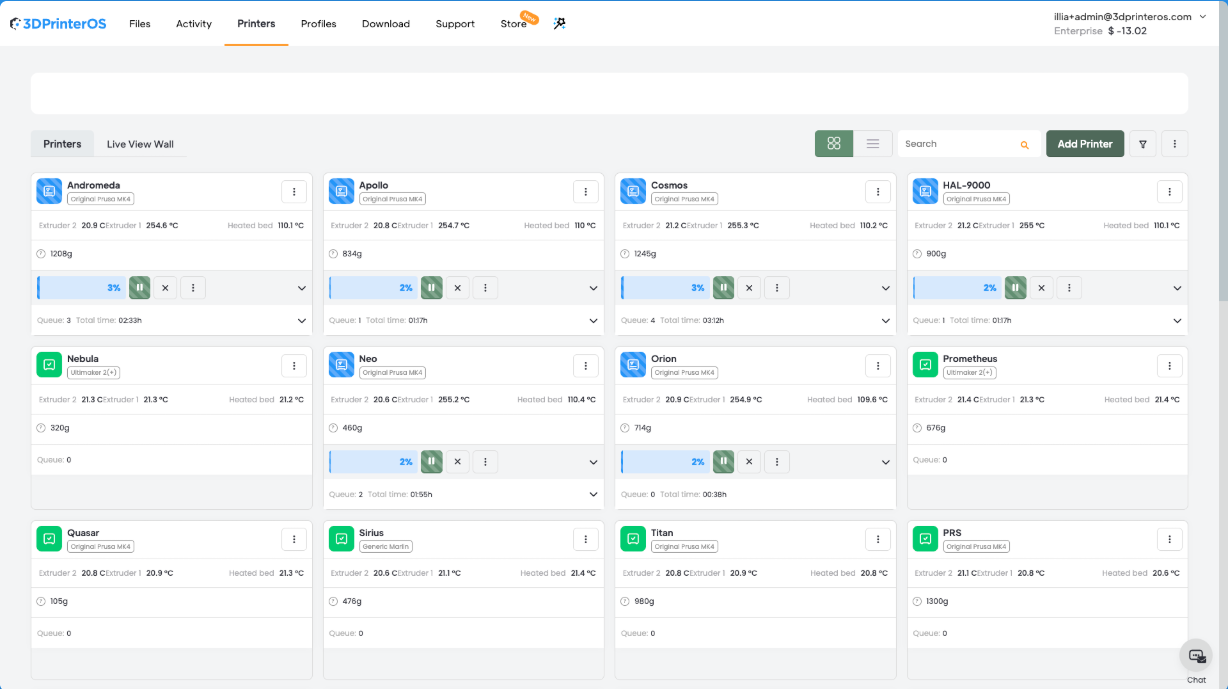
As programs mature, the focus shifts from whether an individual printer is running to whether the fleet is serving the organization effectively. Leaders need to understand utilization patterns, queue delays, recurring failure points, and demand by department or location.
These measures are useful only when interpreted in context. High utilization may signal efficient use, or it may signal insufficient capacity and maintenance risk. Low utilization may indicate excess equipment, or simply the wrong mix of machines. Centralized data gives leaders the evidence needed to investigate before acting.
The common thread is that software determines how effectively additional printers and users can be absorbed. Hardware creates production capability. The operating system turns that capability into a controlled, visible, and scalable operation.
A 3D printer operating system is not another isolated tool beside the slicer and monitoring app. It is the layer that allows those tools to work through shared users, files, printers, and records.
3D printing management software brings order to queues, permissions, files, and fleet activity. Connected 3D printing apps extend the environment into cloud slicing, preparation, monitoring, and notifications. Together, these capabilities help educational institutions, enterprises, OEMs, and shared labs grow without relying on an equally large increase in manual coordination.
The practical test is straightforward. Can the organization obtain one current view of every printer, user, file, and job it manages? If the answer requires checking several applications, spreadsheets, and people, the operation has printers and tools, but it does not yet have a connected stack.
3DPrinterOS brings model preparation, cloud slicing, centralized print management, multiuser administration, remote printing, live monitoring, queues, notifications, and reporting into one customizable environment. Its hardware-agnostic approach allows organizations to apply a common operating model across supported printers while keeping their existing equipment strategy intact.
No. Engineers and designers still use design software to create and revise models. The 3D printer operating system connects with the workflow after or around design, then coordinates preparation, slicing, submission, printing, monitoring, and reporting.
Deployment time depends on fleet size, user count, printer compatibility, file migration, security review, and training needs. Organizations can reduce disruption by defining roles, validating core files and profiles, and testing the workflow with a representative pilot before wider rollout.

Not necessarily. Hardware-agnostic platforms are designed to work with supported printers from multiple manufacturers. 3DPrinterOS supports more than 200 printer models, so many organizations can centralize management while continuing to use existing equipment.
A centralized platform allows administrators to apply consistent user roles, permissions, and access controls across the managed workflow. It can also reduce uncontrolled file copies and shared accounts. Organizations should compare these functions and documented certifications with their own security requirements.
No. The benefits are most visible in large fleets, but smaller labs and makerspaces also gain value when multiple users or printers must share files, settings, and capacity. Establishing a structured workflow early can also make future growth easier to manage.
Separate tools can create fragmented visibility, inconsistent permissions, duplicate files, and repeated administration. A unified operating system centralizes the workflow so teams can manage access, activity, and records through one environment.
3D printing management software organizes the daily operation of a printer fleet. It can manage job queues, printer availability, user roles, approved files, job history, and performance reporting. Its purpose is to make shared resources visible and controllable as demand grows.
Slicing software converts a digital model into instructions a printer can execute. A 3D printer operating system connects slicing with queues, user permissions, file management, printer monitoring, and reporting. Slicing is one function within the broader operational workflow.
A 3D printer operating system is cloud-based software that connects model preparation, slicing, print management, monitoring, and administration in one environment. It helps organizations manage printers, users, files, permissions, and job records across a fleet rather than one machine at a time.

Used by higher education, enterprises, and OEMs to manage printers, files, and users from a single, cloud-based platform

Control access, users, and print permissions by team or lab
“This close collaboration has enabled Koenigsegg to tailor the platform to their specific needs, resulting in an optimized and user-friendly system for managing their 3D printers.”

Team Leader
Koenigsegg Automotive AB
Join us today and become one of our partners